
Workflow Automation for Resolution Drafting in County Government
We replaced a county's manual, Adobe-form resolution process with an automated workflow that drafts resolutions, files and tracks every submission, and gives 30 departments real-time visibility into where their requests stand.
Most counties can’t simply hire their way out of a backlog. Headcount is capped, budgets are tight, and the work still has to get done. The most realistic lever isn’t adding people, it’s freeing the people you already have from low-value drudgery so they can spend their time on work that actually requires their judgment.
That was the goal of this engagement with a county government we’ve partnered with across multiple projects: take one of their most manual, most error-prone internal processes and automate the parts that never needed a human in the first place.
The challenge
Before a county legislature can take action, someone has to draft a resolution, and getting there meant running a long relay of hand-offs.
A department head would fill out an Adobe form, printed or on-screen, with the details the legal department needed. That form went to the clerk of the board, who forwarded it to legal. The county attorney would review it, almost always discover gaps or missing information, and kick off an email exchange to chase down the rest. Only then could the attorney draft the resolution and route it back to the clerk to be placed on the right committee and legislative agendas.
Every step was manual and every step could break. Information arrived incomplete because the form never asked the right questions up front. Submissions lived in inboxes and on individual desktops, each person working from their own downloaded copy of the PDF.
And when something slipped through the cracks, the consequence wasn’t trivial: miss an agenda window and the item waits another month for the next legislative meeting. On top of the lost hours, no one could answer a basic question with confidence: where is my submission right now, and is it going to make the agenda?
What we built
The foundation of the new process wasn’t the flashiest part, but it was the most valuable: we rebuilt the intake. Working with the clerk of the board, we replaced the old Adobe forms with Microsoft Forms and, more importantly, redesigned the questions themselves.
Revisiting a workflow is a chance to stop asking the questions you’ve always asked and start asking the ones you actually need answered, so we restructured the questionnaires to capture everything legal needs on the first pass. Because the forms now live in one place, a change is made once and applies everywhere, instead of being version-controlled across dozens of downloaded copies.
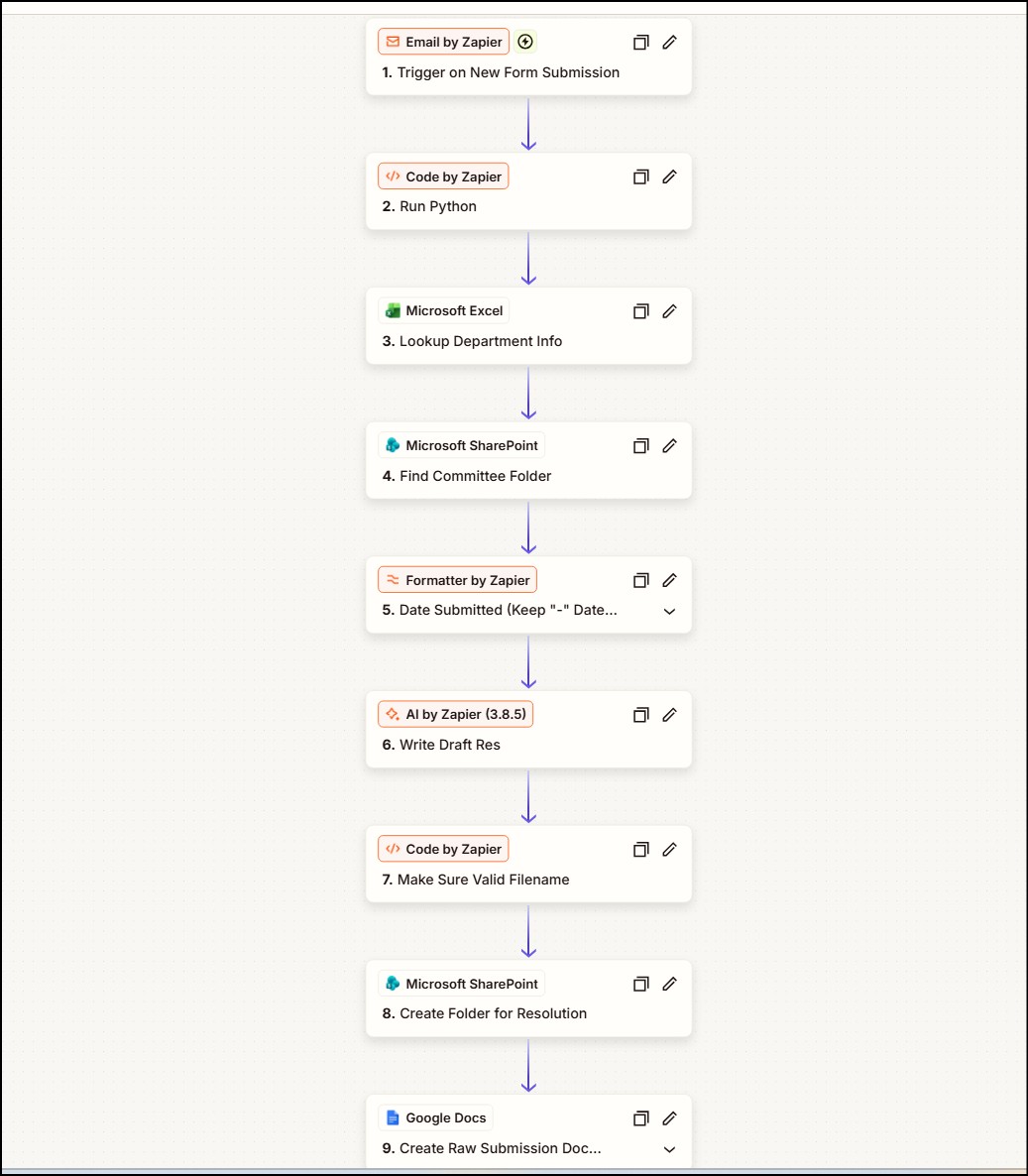
On top of that intake, we built an automated pipeline using a combination of OpenAI’s models, Zapier, and Power Automate. The moment a department head submits a form, the system:
- Drafts the resolution automatically, so the county attorney starts from a complete first draft to review and refine rather than a blank page.
- Creates a dedicated SharePoint folder for that submission, where every artifact lands, the raw submission and the draft resolution together in one purpose-built place.
- Logs it to a master tracker that the clerk of the board can read and write and that department heads can view, so the status of every request is visible at a glance.
- Sends notifications automatically, an acknowledgment to the submitting department head and alerts to the county attorney and the clerk that a new submission has arrived and been logged.
The AI-assisted drafting is the piece that catches everyone’s attention, and it should, it’s genuinely useful. But the bulk of the value lives in everything around it: an intake that collects the right information the first time, and automation that guarantees every submission is filed, tracked, and acknowledged without anyone lifting a finger.
The outcome
This is live today, not a design on paper, and it changed two things at once: how fast the work moves, and what it feels like to be part of it.
On efficiency, the gains come from cutting the back-and-forth. A redesigned form that captures the right details up front removes most of the “we need more information” round trips, and a pre-drafted resolution means the attorney is editing rather than starting cold. By a rough internal estimate, the hands-on time per resolution has been cut by roughly half.
But the bigger story is the internal customer experience. For the 30 departments feeding this process, and for the clerk of the board who sits at the center of it, the experience is dramatically better. Every submission is automatically acknowledged, filed in its own folder, and logged to a shared tracker, so nothing is lost and nothing is a mystery. No one has to wonder whether their request was received, where it stands, or whether it will make the agenda in time. That certainty, more than any single saved hour, is what people notice.
It also sets the county up for what’s next. With a clean, automated, fully tracked workflow in place, the same pattern, better intake plus automation around it, can be pointed at the next manual process, and the next. For a county that can’t hire its way to more capacity, that’s how you create it instead.